

Obtain Your OpenHands LLM API Key
- Log in to OpenHands Cloud.
- Go to the Settings page and navigate to the
API Keystab. - Copy your
LLM API Key.
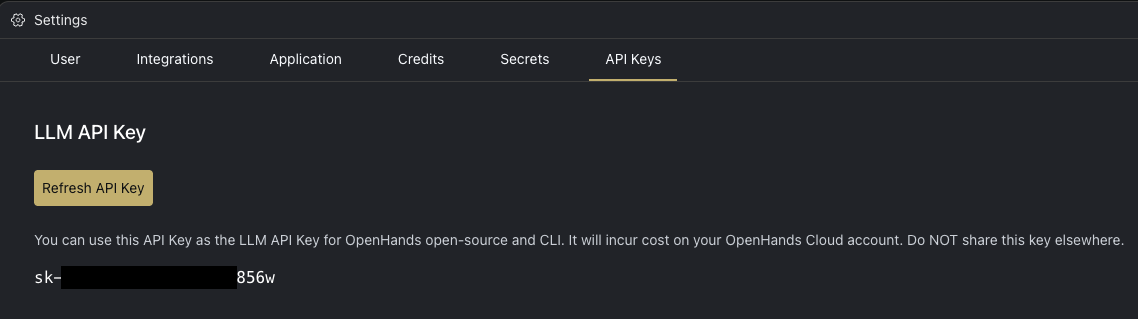
Configuration
When running OpenHands, you’ll need to set the following in the OpenHands UI through the Settings under theLLM tab:
LLM ProvidertoOpenHandsLLM Modelto the model you will be using (e.g. claude-sonnet-4-20250514 or claude-sonnet-4-5-20250929)API Keyto your OpenHands LLM API key copied from above
Using OpenHands LLM Provider in the CLI
- Run OpenHands CLI.
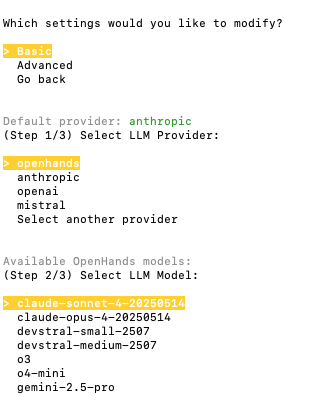
- To select OpenHands as the LLM provider:
- If this is your first time running the CLI, choose
openhandsand then select the model that you would like to use. - If you have previously run the CLI, run the
/settingscommand and select to modify theBasicsettings. Then chooseopenhandsand finally the model.
Pricing
Pricing follows official API provider rates. Below are the current pricing details for OpenHands models:
Note: Cached input tokens are charged at a reduced rate when the same content is reused across requests. Models that don’t support prompt caching show “N/A” for cached input cost.